Controllers and Availability Managers
1. Overview
This chapter covers the objects that decide how hard a component works and whether it runs at all:
- Controllers. A
Controller:WaterCoilmodulates a water coil’s water flow to hold the setpoint at the coil’s air outlet. AController:OutdoorAirsets how much outdoor air an air loop’s mixer draws, and aController:MechanicalVentilationadds zone-by-zone ventilation requirements to it. - Availability managers. An
AvailabilityManager:*switches an air loop, a plant loop, or a zone unit on or off, overriding its fan or pump schedule: a night cycle to hold setback temperatures, an optimum start before occupancy, a lockout below an outdoor temperature. - Control zones and sensor nodes, which several managers read, and the zone humidistat (
ZoneControl:Humidistat), which humidity controls read.
Setpoint managers, which place the setpoints that controllers and coils work to, are covered in Air Loops, Branches, and Nodes for air loops and in Central Plant Equipment and Plant Loops for plant loops; §7 summarizes where each kind is set up. Zone thermostats are covered in Internal Loads, Space Types, and Zone Types.
None of these objects appear in the HVAC diagram. Each is edited in the dialog of the object it belongs to: a water coil’s controller in the coil’s dialog, an outdoor air controller in the mixer’s dialog, and availability managers in the dialog of the loop or unit they switch.
2. Controllers
2.1 Controller:WaterCoil
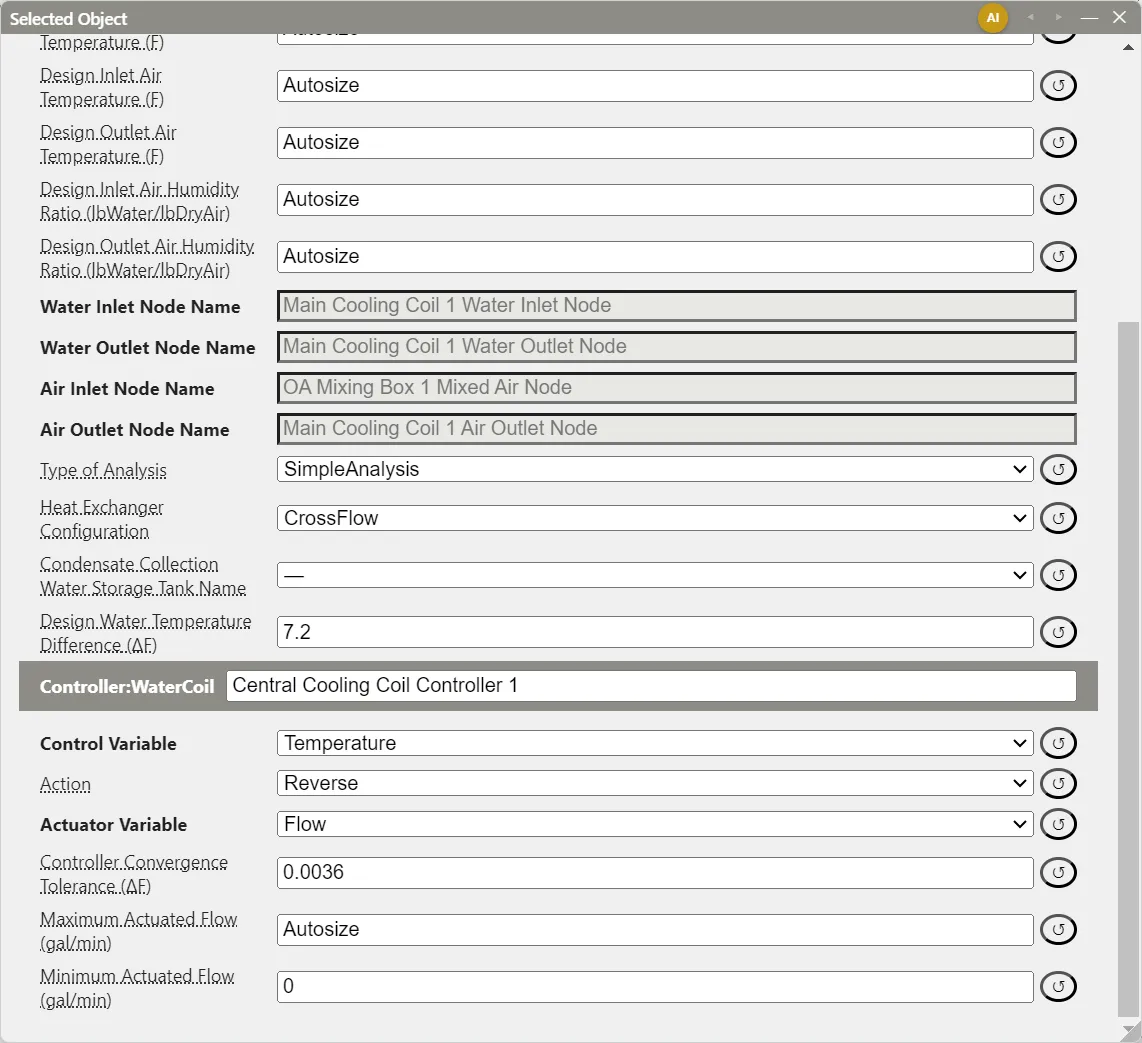
A Controller:WaterCoil reads the air temperature at one node (the sensor node) and adjusts the water flow at another (the actuator node) until the sensor node reaches the setpoint a setpoint manager has placed there. The controller holds no setpoint value: it works to whatever setpoint is on its sensor node. EnergyPlus solves for the water flow by interval halving, because a water coil’s model cannot be inverted directly.
Every Coil:Cooling:Water, Coil:Cooling:Water:DetailedGeometry, and Coil:Heating:Water placed on an air loop branch, on the supply side or on an outdoor air or relief stream, gets a controller when it is placed. Its fields appear in the coil’s dialog, below the coil’s fields, while the coil sits on an air loop. EP3 fills in at export:
- Sensor Node Name: the coil’s air outlet node.
- Actuator Node Name: the coil’s water inlet node.
Neither is shown in the dialog. The controller is named <coil name> Controller and listed in the loop’s AirLoopHVAC:ControllerList, or in the outdoor air system’s when the coil is on an outdoor air stream. A water coil inside a composite unit, such as a fan coil’s cooling coil or a VAV terminal’s reheat coil, has no Controller:WaterCoil: the unit or terminal drives the coil’s water flow (Zone-Level HVAC Equipment and Zone Sizing).
The fields:
| Field | Default | Purpose |
|---|---|---|
| Control Variable | Temperature |
What the sensor node holds: Temperature, HumidityRatio, or TemperatureAndHumidityRatio (§2.2). |
| Action | Normal for a heating coil, Reverse for a cooling coil |
The direction in which more water flow moves the sensor node’s temperature. A cooling coil is Reverse: more chilled water lowers the outlet temperature. |
| Actuator Variable | Flow |
The only choice: the coil’s water flow rate. |
| Controller Convergence Tolerance | Autosize | The largest difference between the sensor node temperature and its setpoint at which the controller stops iterating. Autosize lets EnergyPlus set it. |
| Maximum Actuated Flow | Autosize | The most water the controller can command; Autosize uses the coil’s design water flow rate. |
| Minimum Actuated Flow | 0 | The least water the controller can command; 0 is a shut-off valve. |
The flow rates display in gal/min in IP units. On a replicated loop the controller’s fields have one column per replicate, like the coil’s (Air Loops, Branches, and Nodes).
The controller needs a setpoint on the coil’s air outlet node. A new air loop’s SetpointManager:MixedAir covers both coil outlets and the mixer’s mixed air node; a coil added later needs a setpoint manager that targets its outlet. The Validation dialog fails a loop whose water coil outlet has no setpoint, because EnergyPlus stops with a missing-setpoint error (Air Loops, Branches, and Nodes).
2.2 Humidity control on a cooling coil
TemperatureAndHumidityRatio makes a cooling coil meet both the temperature setpoint at its outlet and a maximum humidity ratio there, so the coil overcools to dehumidify when a zone is too humid. HumidityRatio controls to the humidity ratio alone, the usual choice for a coil that serves only as a dehumidifier. Both require:
- A
ZoneControl:Humidistaton the controlled zone (§6). - A maximum-humidity setpoint manager on the coil’s air outlet node:
SetpointManager:SingleZone:Humidity:Maximumfor a loop that serves one zone, orSetpointManager:MultiZone:Humidity:MaximumorSetpointManager:MultiZone:MaximumHumidity:Averagefor one that serves several. EP3 sets a single-zone humidity manager’s control zone to a served zone that has a humidistat. - Control Variable set to
TemperatureAndHumidityRatio(orHumidityRatio) on the coil’s controller.
The coil’s outlet then carries a temperature setpoint and a humidity setpoint from two managers. The Validation dialog reports a node set by more than one manager, one of them a humidity manager, as a failure (Air Loops, Branches, and Nodes); for this pairing the two managers set different quantities and both are required. A heating coil downstream of the cooling coil reheats the overcooled air to its setpoint. A coil on the outdoor air stream may also need a SetpointManager:OutdoorAirPretreat.
2.3 Controller:OutdoorAir and Controller:MechanicalVentilation
Each OutdoorAir:Mixer on an air loop has a Controller:OutdoorAir, created with the mixer, whose fields appear in the mixer’s dialog. EP3 fills in its relief, return, mixed air, and actuator nodes from the mixer at export, and its Minimum Outdoor Air Flow Rate and Maximum Outdoor Air Flow Rate start at Autosize. The mixer’s Use Controller:MechanicalVentilation? switch adds a Controller:MechanicalVentilation with a row per served zone (Air Loops, Branches, and Nodes). Economizers, minimum outdoor air, and demand-controlled ventilation are covered in Outdoor Air, Ventilation, and Energy Recovery.
3. Availability Managers
3.1 Where they attach
EnergyPlus reads availability managers from an AvailabilityManagerAssignmentList named by the managed object. In EP3 you add the managers to the object and EP3 writes the list. The objects that take one are those whose EnergyPlus class has an Availability Manager List Name field:
- an
AirLoopHVAC; - a
PlantLoop; - zone units such as
ZoneHVAC:FourPipeFanCoil,ZoneHVAC:PackagedTerminalAirConditioner,ZoneHVAC:PackagedTerminalHeatPump,ZoneHVAC:WaterToAirHeatPump,ZoneHVAC:UnitHeater,ZoneHVAC:UnitVentilator,ZoneHVAC:WindowAirConditioner, andZoneHVAC:TerminalUnit:VariableRefrigerantFlow.
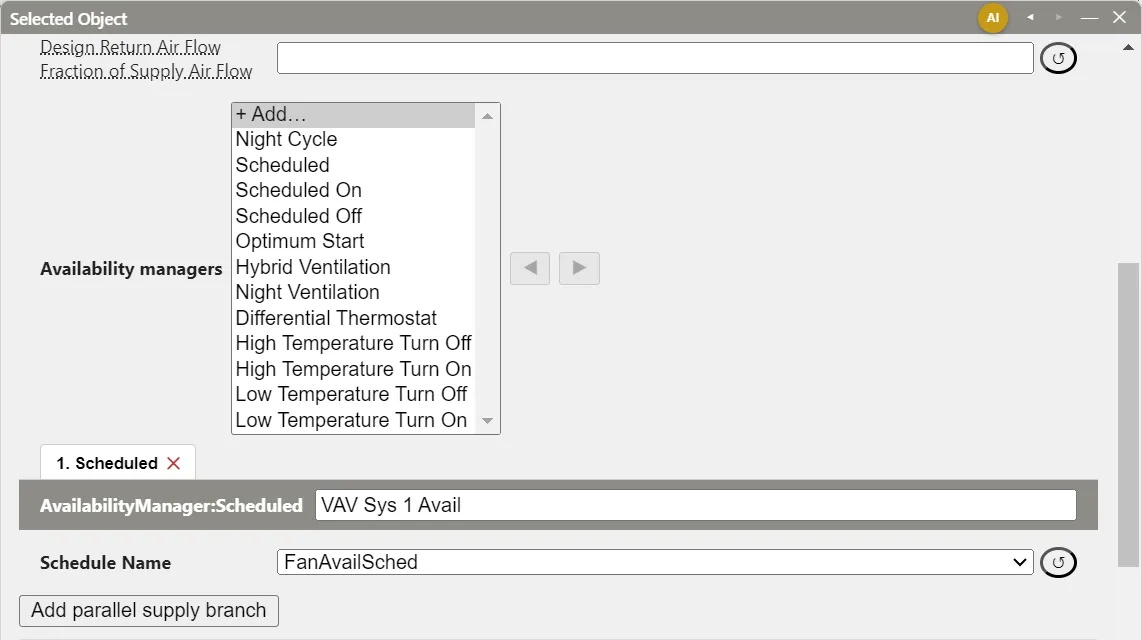
Open the object in the Selected Object dialog (The EP3 Interface and Model Settings). The Availability managers section sits below a loop’s fields, or below a zone unit’s tabs:
- + Add… lists every
AvailabilityManager:*type and adds a manager of the chosen type at the end of the list. Its name is the owner’s name followed by the type, such asVAV Sys 1 Night Cycle. - Each manager has a tab, numbered in list order (1. Scheduled, 2. Low Temperature Turn Off). The tab shows the manager’s fields; its ✕ removes the manager.
- ◀ and ▶ move the selected tab’s manager earlier or later in the list.
With no managers, the section reads “None. The object is available whenever its own availability schedule allows.” Moving the pointer over a manager’s fields highlights the object it manages in the HVAC diagram. Copying an object copies its managers, each with “ Copy” added to its name. A zone unit’s managers have a column per zone, like the unit’s fields, and an air loop’s a column per replicate.
An air loop shows the Availability managers section only while its Night Cycle Control is No. With Yes, the loop has a built-in AvailabilityManager:NightCycle on a Night Cycle tab instead (Air Loops, Branches, and Nodes). To combine a night cycle with other managers, set Night Cycle Control to No and add a Night Cycle manager to the list (§4.3).
3.2 How EnergyPlus combines several managers
Each manager reports one status each time step: NoAction, ForceOff, CycleOn, or, on an air loop, CycleOnZoneFansOnly. How a list’s statuses combine depends on what the list belongs to:
- Air loops and zone units use precedence. Any
ForceOffwins; otherwise anyCycleOnZoneFansOnly(air loops only); otherwise anyCycleOn; otherwiseNoAction. The order of the list does not change the result. - Plant loops use order. The managers are evaluated from the top, and the first one that reports anything other than
NoActionsets the loop’s status; the managers after it are not consulted. Use ◀ and ▶ to put the deciding manager first.
AvailabilityManager:DifferentialThermostat never reports NoAction, so EnergyPlus requires it to be the last manager in a list; any manager after it is never evaluated, and EnergyPlus writes a warning.
EnergyPlus does not accept every type on every owner. A plant loop’s list may not hold AvailabilityManager:NightCycle or AvailabilityManager:NightVentilation (EnergyPlus stops with a severe error). A zone unit may not use AvailabilityManager:NightVentilation, and a Night Cycle manager on a zone unit works only with Control Type CycleOnControlZone or StayOff. + Add… lists every type for every owner, so choose a type the owner supports.
3.3 How the status overrides fans and pumps
A loop’s status acts through its prime movers: the fans of an air loop and the pumps of a plant loop. Each fan or pump also has an availability schedule. ForceOff turns the fan or pump off while its schedule says on, and CycleOn turns it on while its schedule says off. Only NoAction leaves the decision to the schedule.
So the fans’ schedule sets the hours a loop normally runs, and the managers adjust those hours. AvailabilityManager:NightCycle and AvailabilityManager:OptimumStart only ever report NoAction or CycleOn: they can start a loop that is scheduled off, never stop one that is scheduled on. A loop whose fans are on Always On therefore runs every hour of the year, whatever these two managers say. On the Model Wizard’s three-floor office (Dulles), the AirLoopHVAC Water Coils VAV Reheat system ran 8,760 hours with its fan on Always On, against 7,180 hours (including night cycling and early starts) on the office HVAC schedule, and used 25% more site energy (858,543 against 688,596 kWh). A ForceOff manager such as AvailabilityManager:ScheduledOff would stop the loop at night, but it also overrides the night cycle and the optimum start. For a loop that is off at night, cycles to hold the setback setpoints, and starts early enough to meet the occupied setpoints, put its fans on the HVAC operation schedule. The night cycle and the optimum start of an air loop always use the supply fan’s schedule as their Fan Schedule Name (§3.6), so they stay in step with it. Follow ZoneHVAC Fan Operating Mode Schedules sets the fans’ schedule from the zones the loop serves (§3.6).
An air loop’s status also passes to the Fan:ZoneExhaust fans and to the fans of series and parallel PIU terminals and variable-speed-fan VAV reheat terminals in the zones it serves. Other zone units ignore the air loop’s managers and follow their own lists. A zone unit’s managers act only while the unit’s availability schedule is on: a fan coil scheduled off stays off whatever its managers report.
3.4 What EP3 writes at export
For each exported copy of the owner (the loop, each replicate of a replicated air loop, each zone’s copy of a zone unit), EP3 writes:
- each manager, under its name, prefixed by the replicate’s or zone copy’s name when the owner has several copies;
- an
AvailabilityManagerAssignmentListnamed<copy name> Availability Manager List, with the managers in order, and the owner’s Availability Manager List Name pointing to it; - the control zone fields (§5) and the sensor nodes (§4.2) the manager leaves to EP3;
- for an air loop’s
AvailabilityManager:HybridVentilation, its HVAC Air Loop Name, set to the loop’s (or replicate’s) name.
A manager that cannot be written, such as a temperature manager with no sensor node or a blank required Temperature, is left out with an error, listed in Model Validation’s export messages (Model Troubleshooting and Quality Assurance).
3.5 Availability managers and EEMs
An availability manager’s fields follow the active EEM like any other field: edit them with an EEM selected to give that EEM different values (Energy Efficiency Measures (EEMs)). A manager’s sensor nodes are the same in every EEM. An air loop’s Night Cycle Control is also stored per EEM, so an EEM can add or drop the built-in night cycle. A manager exists in every EEM in which its owner exists; to disable one in an EEM, set its Control Type to StayOff, or its applicability schedule to an off schedule, with that EEM active.
Manage availability in EEMs, a button in the Selected Object dialog, is a different mechanism: it switches the selected objects themselves on or off in each EEM (Energy Efficiency Measures (EEMs)). An object that is off in an EEM is not exported there, and neither are its availability managers. Availability managers decide when an exported object runs during the simulation.
3.6 Follow ZoneHVAC Fan Operating Mode Schedules
An air loop’s fans and its night cycle and optimum start have to name the same schedule (§3.3). EP3 keeps them together in two steps.
The managers take the supply fan’s schedule. An AvailabilityManager:NightCycle, AvailabilityManager:OptimumStart, or AvailabilityManager:NightVentilation that belongs to an air loop, whether it is the loop’s built-in night cycle or a manager in its list, has no Fan Schedule Name to fill in. Its dialog shows a read-only line in its place, such as Fan schedule: follows the supply fan (FanAvailSched), and the export writes that schedule’s name. The supply fan is the first fan on the loop’s supply branch; for a unitary system, it is the fan inside the unit, or the unit’s own availability schedule when the fan has none. A fan with no schedule is always available, so the manager gets Always On. Replication and EEMs apply to the fan, so each copy of a replicated loop, and each EEM, writes the schedule its own fan is written with. A fan that is switched off in the EEM being exported does not count. A loop with one of these managers and no supply fan reports an export error naming the manager and the loop, and the manager is left out.
The fans can follow the zones. The schedule dropdown of the fans offers a first choice, Follow ZoneHVAC Fan Operating Mode Schedules, which is not an EnergyPlus value:
- the Availability Schedule Name of a fan on an air loop (supply, return, relief, or outdoor air stream), of a unitary system or other composite unit on the supply branch, and of the fan inside that unit.
The loop then runs whenever any zone it serves has its supply air fan operating mode schedule above 0. For each served zone EP3 takes the first of these that exists (Zone-Level HVAC Equipment and Zone Sizing):
- the ZoneHVAC Supply Air Fan Operating Mode Schedule Name of the zone’s ZoneType, including the value set for that zone in the ZoneType’s per-zone column. Air terminals (VAV, parallel and series powered induction units and the like) have no fan operating mode field, so the ZoneType is where their zones get it from;
- only when the zone has no ZoneType, or its ZoneType leaves the field blank: the same field on the Zone itself, then the Supply Air Fan Operating Mode Schedule Name of the zone’s own unit, for the unit classes that have one (a value for this zone, floor, or group of zones, or the plain value);
- otherwise the zone counts as always off. It adds nothing to the loop’s schedule, so it does not keep the loop running.
Each exported copy of the loop is resolved on its own zones, so a loop replicated per zone, per floor, or per group of zones follows only the zones of each replicate, and the choice is resolved in the EEM being exported.
- One schedule. When every zone of the copy that has a schedule resolves to the same one, EP3 writes that schedule’s name in the fans.
- Several schedules. EP3 writes a
Schedule:Compactnamed<copy name> Zone Fan Operating Mode, with theOn Offlimits, that is 1 in every hour of every day type in which any of the zones’ schedules is above 0, and 0 otherwise. The day types are the seven days of the week, holidays, the summer and winter design days, andCustomDay1andCustomDay2, so the sizing days follow the zones as well. Copies that produce the same schedule share one object. When the combined schedule equals the schedule of one zone, such as a zone that is always on, EP3 writes that zone’s schedule and no new object. - No zone has a schedule. The fans get the locked Always Off schedule (EP3 writes an all-zero schedule of its own if the model has none), and the loop runs only when its availability managers start it.
Model Validation’s Export Errors & Warnings lists a warning for each loop copy that has zones with no fan operating mode schedule, naming them: no Supply Air Fan Operating Mode Schedule on its ZoneType: this zone does not keep the air loop running. When every zone of a copy has none, the warning names the loop copy and says that it runs only when its availability managers start it. Give those zones’ ZoneType a ZoneHVAC Supply Air Fan Operating Mode Schedule Name to correct either.
EP3 evaluates Schedule:Constant, Schedule:Compact (including changes within an hour), and Schedule:Year with its Schedule:Week:Daily or Schedule:Week:Compact and Schedule:Day:Hourly, Schedule:Day:Interval or Schedule:Day:List. Schedules with changes within an hour are combined at the finest interval present, and the generated schedule has Until: hh:mm entries at those times. When the zones of a copy resolve to different schedules and one of them is a Schedule:File (or its data is incomplete), the schedules cannot be combined. The choice is then marked unavailable in the dropdown, the dialog warns with the zone and schedule that cause it, and the export reports an error naming them and leaves the field out: choose one schedule for the fans, or give the zones the same schedule. Nothing is substituted silently. If every zone of the copy uses the same Schedule:File, the file schedule is written as it is.
While the choice is selected, a note under the fields lists, for each copy of the loop, the zones with the schedule each resolves to (or “Always Off” with the reason), and says whether the choice is written as one of those schedules or as the generated one. The managers’ read-only line shows the same result. Importing a file keeps the schedule names its fans carry; a loop that EP3 would have exported with a generated union comes back with that schedule named in the fans, and the choice is selected again only by choosing it. A NightCycle or OptimumStart in the file whose Fan Schedule Name differs from its supply fan’s schedule is imported following the supply fan, and the import report lists it, naming both schedules.
The Appendix G Baseline keeps the HVAC schedules of the Proposed (Table G3.1, Baseline column). A Baseline fan made from a Proposed fan that follows the zones gets the same schedule the export would write, or a generated schedule that is on whenever any of the zones’ schedules is, and a Baseline loop whose zones have different operation schedules runs its fans on that combined schedule (ASHRAE 90.1 Performance Rating Method).
4. The Manager Types
EP3 offers all twelve EnergyPlus availability manager types. Field labels below are the dialog’s.
4.1 Schedule-driven: Scheduled, ScheduledOn, ScheduledOff
Each has one field, Schedule Name, which starts at Always On.
| Type | Schedule > 0 | Schedule = 0 |
|---|---|---|
AvailabilityManager:Scheduled |
CycleOn |
ForceOff |
AvailabilityManager:ScheduledOn |
CycleOn |
NoAction |
AvailabilityManager:ScheduledOff |
NoAction |
ForceOff |
Scheduled decides in both directions, so its schedule alone sets when the system runs. Because CycleOn overrides the fan schedule (§3.3), a Scheduled manager left at Always On runs the system around the clock; set Schedule Name to the schedule the system should follow. The 5ZoneAirCooled example’s air loop uses one with its fans’ availability schedule, FanAvailSched. ScheduledOn and ScheduledOff each assert one direction and report NoAction the rest of the time, which leaves the decision to the other managers in the list: a ScheduledOff added to a loop with a night cycle, for example, shuts the loop down through a holiday period whatever the zone temperatures.
4.2 Temperature-driven: Low and High Temperature, and DifferentialThermostat
The four single-sensor types compare the temperature at a Sensor node with their Temperature field:
| Type | Reports | When the sensor node is |
|---|---|---|
AvailabilityManager:LowTemperatureTurnOff |
ForceOff |
below Temperature |
AvailabilityManager:LowTemperatureTurnOn |
CycleOn |
below Temperature |
AvailabilityManager:HighTemperatureTurnOff |
ForceOff |
above Temperature |
AvailabilityManager:HighTemperatureTurnOn |
CycleOn |
above Temperature |
Otherwise each reports NoAction. LowTemperatureTurnOff also has an optional Applicability Schedule Name; while it is 0 the manager does nothing, and blank means always active. Temperature has no default, so a new manager is reported as missing a required field until it is set.
AvailabilityManager:DifferentialThermostat reads a Hot node and a Cold node. With ΔT = Thot − Tcold, it reports CycleOn once ΔT reaches Temperature Difference On Limit, and ForceOff once ΔT falls below Temperature Difference Off Limit (which defaults to the On Limit). Between the two limits it keeps its previous status, so the limits form a deadband. It has no applicability schedule, never reports NoAction, and must be last in its list (§3.2).
Picking a sensor node. The node fields are not typed. Below the manager’s fields, each Sensor node (or Hot node and Cold node) has two lists and a button:
- The first list picks an object. Its Outdoor air group offers Outdoor air (standard node) and any
OutdoorAir:Nodeobjects in the model; its HVAC objects group lists every object with nodes: loops, components, and zone units. - The second list picks which of the object’s nodes, such as its Air Outlet or Supply Side Outlet node. Moving the pointer over the row highlights the node in the HVAC diagram.
- + New outdoor air node adds an
OutdoorAir:Nodeobject, named<manager name> Outdoor Air Node, and points the sensor at it. Its fields (Height Above Ground and the dry-bulb, wet-bulb, wind speed, and wind direction schedules that override the weather file) are edited in the main object dialog.
For Outdoor air (standard node), EP3 writes a node named <manager name> Outdoor Air Node (Hot Outdoor Air Node or Cold Outdoor Air Node for a differential thermostat) and lists it in an OutdoorAir:NodeList named <owner copy name> Availability Outdoor Air Nodes, so EnergyPlus sets it to outdoor conditions. For a node of an HVAC object, EP3 writes that node’s name, renamed per replicate on a replicated air loop. Either node of a differential thermostat may be an outdoor air node. A sensor whose object has been deleted is reported at export and the manager is left out.
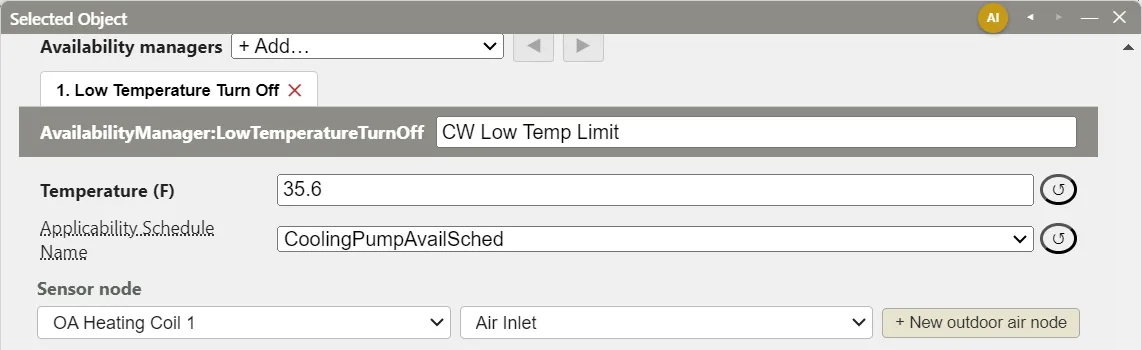
Example: a chilled water lockout. In the 5ZoneAirCooled example, the Chilled Water Loop has a LowTemperatureTurnOff whose sensor is the inlet node of the outdoor air stream, which the sensor-node picker shows as OA Heating Coil 1 and Air Inlet, and whose Temperature is 2.0°C (35.6°F), with Applicability Schedule Name CoolingPumpAvailSched (1 all year). As the inlet of the outdoor air stream, the node carries outdoor conditions. While the outdoor dry-bulb is below 2.0°C (35.6°F) the manager reports ForceOff and the loop’s pump stays off; above it, the manager reports NoAction and the pump’s schedule decides. It is the loop’s only manager, so under the plant rule of §3.2 it decides whenever it acts.
Example: a solar collector loop deadband. A differential thermostat with the collector outlet as Hot node, the storage tank’s source outlet as Cold node, an On Limit of 10 K (18°F), and an Off Limit of 2 K (3.6°F) starts the collector pump when the collector leaves water 10 K (18°F) warmer than the tank, and stops it when the difference falls below 2 K (3.6°F). With the collector outlet at 60°C (140°F) and the tank at 52°C (125.6°F), ΔT = 8 K (14.4°F): between the limits, so the pump stays as it was. These limits are the ones in the Input Output Reference’s example.
4.3 NightCycle
AvailabilityManager:NightCycle turns a system on, while its fans are scheduled off, when a zone drifts outside its thermostat setpoints. It can only turn a system on; it never forces it off.
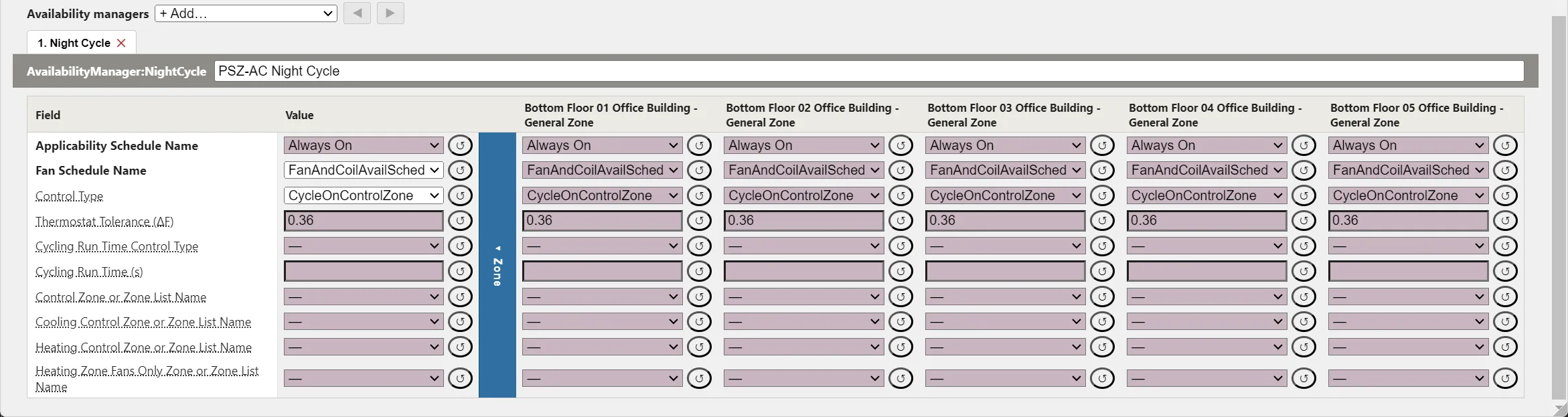
An air loop gets one either from Night Cycle Control Yes (Air Loops, Branches, and Nodes) or as a manager in its list. A zone unit has no Night Cycle Control and takes a Night Cycle manager in its list; a plant loop cannot use one. A Night Cycle manager added with + Add… starts with:
- Applicability Schedule Name: Always On. While this schedule is 0, the manager reports
NoAction. - Fan Schedule Name: on a zone unit, Always On to start with. The manager reports
NoActionwhenever this schedule is above 0, because the system is then scheduled on already, so at Always On the manager never acts. Set it to the availability schedule of the zone unit’s supply fan. On an air loop the field is not shown: the manager always uses the schedule of the loop’s supply fan (§3.6). - Control Type
CycleOnAnyand Thermostat Tolerance 0.2°C (0.36°F). The EnergyPlus defaults, which apply when a field is cleared, areStayOffand 1°C (1.8°F). - Cycling Run Time Control Type
FixedRunTimeand Cycling Run Time 3600 s, the EnergyPlus defaults.
Control Type sets which zones are checked and what is switched on:
| Control Type | Turns on | When |
|---|---|---|
CycleOnAny |
the loop | any zone the loop serves is outside its setpoints |
CycleOnControlZone |
the loop, or the zone unit | a zone in Control Zone or Zone List Name is outside its setpoints |
CycleOnAnyZoneFansOnly |
the zone fans only | any served zone is outside its setpoints |
CycleOnAnyCoolingOrHeatingZone |
the loop, or the zone fans only | a zone in Cooling Control Zone or Zone List Name is above its cooling setpoint, or one in Heating Control Zone or Zone List Name is below its heating setpoint; failing both, the zone fans when one in Heating Zone Fans Only Zone or Zone List Name is below its heating setpoint |
CycleOnAnyCoolingZone |
the loop | a zone in the cooling list is above its cooling setpoint |
CycleOnAnyHeatingZone |
the loop, or the zone fans only | a zone in the heating list is below its heating setpoint; failing that, as for the fans-only list |
CycleOnAnyHeatingZoneFansOnly |
the zone fans only | a zone in the fans-only list is below its heating setpoint |
StayOff |
nothing | never |
EP3 fills the zone fields the chosen Control Type uses when they are blank (§5). On a zone unit, use CycleOnControlZone: the control zone is then the zone the unit serves. EnergyPlus ignores any other control type on a zone unit and writes a warning.
Cycling Run Time Control Type sets how long a cycle lasts:
FixedRunTime: the system turns on when a zone is more than half the Thermostat Tolerance below its heating setpoint or above its cooling setpoint, and runs for Cycling Run Time seconds before the manager checks again.Thermostat: the system turns on when a zone is more than 0.05°C (0.09°F) outside its setpoint and runs until the zone is back within 0.05°C. Thermostat Tolerance and Cycling Run Time are not used.ThermostatWithMinimumRunTime: asThermostat, but each cycle runs at least Cycling Run Time.
A zone without a thermostat is never outside its setpoints, so the manager does not respond to it (Zone-Level HVAC Equipment and Zone Sizing).
Worked example: when the night cycle starts. A zone uses the Simple thermostat defaults, with unoccupied setpoints of 18°C (64.4°F) heating and 29°C (84.2°F) cooling (Internal Loads, Space Types, and Zone Types). With FixedRunTime and the starting Thermostat Tolerance of 0.2°C, the manager cycles the system on below
Ton,heat = Theat − ½ Ttol = 18 − ½ × 0.2 = 17.9°C
and above Ton,cool = 29 + 0.1 = 29.1°C, then runs the system for 3600 s (1 h). In IP units the tolerance is 0.36°F, so the thresholds are 64.4 − 0.18 = 64.22°F and 84.2 + 0.18 = 84.38°F (check: 17.9 × 1.8 + 32 = 64.22°F). With the EnergyPlus default tolerance of 1°C (1.8°F), the heating threshold falls to 18 − 0.5 = 17.5°C (63.5°F), and the zone drifts further before the system starts. With Thermostat, the threshold is 18 − 0.05 = 17.95°C (64.31°F) whatever the tolerance, and the cycle ends when the zone is back within 0.05°C of 18°C.
4.4 OptimumStart
AvailabilityManager:OptimumStart starts a system early enough that the zones reach their occupied setpoints when the fan schedule turns on, in place of a fixed start time every day. Like a night cycle it reads Applicability Schedule Name and Fan Schedule Name, both starting at Always On. It finds the occupancy start from the fan schedule: on an air loop that is the supply fan’s schedule, written automatically (§3.6), and on a zone unit you set Fan Schedule Name to the unit fan’s availability schedule.
- Control Type:
ControlZone(the starting value) uses the zone in Control Zone Name, which EP3 fills when blank (§5); on an air loop the field offers only the zones the loop serves.MaximumofZoneListtakes the earliest start needed by the zones of theZoneListin Zone List Name, which must be chosen.AutoMaximumOfZoneList, an EP3 option, takes the earliest start needed by the zones the loop (or zone unit) serves; the two zone fields are hidden and the manager’s tab says what is written.StayOffdisables the manager. - Maximum Value for Optimum Start Time: the earliest start, in hours before occupancy (6 by default).
- Control Algorithm (
AdaptiveASHRAEby default) and its inputs:ConstantStartTime: start Constant Start Time hours before occupancy every day.ConstantTemperatureGradient: divide the gap between the zone temperature and its occupied setpoint by Constant Temperature Gradient during Heating (or during Cooling), in °C/h.AdaptiveTemperatureGradient: as above, starting from Initial Temperature Gradient during Heating and during Cooling and adjusting to the average gradient of the last Number of Previous Days (2 to 5).AdaptiveASHRAE: the ASHRAE Handbook recovery-time equations, with coefficients EnergyPlus fits from previous days; it needs no gradient inputs.
Worked example: a constant temperature gradient. The fan schedule turns on at 8:00, the occupied heating setpoint is 21.0°C (69.8°F), and Constant Temperature Gradient during Heating is 2°C/h (3.6°F/h). On a morning when the zone has fallen to 15.0°C (59.0°F), the start time before occupancy is
t = (Tset − Tzone) / G = (21.0 − 15.0) / 2 = 3.0 h
so the system starts at 5:00. In IP units, (69.8 − 59.0) / 3.6 = 10.8 / 3.6 = 3.0 h. On a colder morning with the zone at 8.0°C (46.4°F), t = 13.0 / 2 = 6.5 h (in IP, 23.4 / 3.6 = 6.5 h), which Maximum Value for Optimum Start Time caps at 6 h: the system starts at 2:00, and at the assumed gradient the zone reaches 8.0 + 6 × 2 = 20.0°C (46.4 + 6 × 3.6 = 68.0°F) by 8:00, 1 K (1.8°F) short of the setpoint.
4.5 Ventilation-driven: NightVentilation and HybridVentilation
AvailabilityManager:NightVentilation runs an air loop at night to precool the building with outdoor air. While the fan schedule is off and the applicability schedule is on, it reports CycleOn when all of these hold:
- some zone the loop serves is warmer than Ventilation Temperature Schedule Name;
- no zone the loop serves is below Ventilation Temperature Low Limit (15°C, 59°F by default);
- the control zone’s temperature minus the outdoor temperature exceeds Ventilation Temperature Difference (2 K, 3.6°F by default).
While it is on, the loop runs at Night Venting Flow Fraction (1 by default) of its design flow. With the default difference, a control zone at 26°C (78.8°F) ventilates while the outdoor air is below 24°C (75.2°F). Applicability Schedule Name starts at Always On. On an air loop the manager has no Fan Schedule Name field: it uses the supply fan’s schedule, like a night cycle (§3.6). EP3 fills Control Zone Name when blank (§5). Use it on air loops only: EnergyPlus does not allow it on plant loops or zone units.
AvailabilityManager:HybridVentilation switches between natural ventilation and the HVAC system: when its control mode finds the conditions right, it shuts the system off and lets ZoneVentilation:* objects or AirflowNetwork openings ventilate the zone. Ventilation Control Mode Schedule Name (required, no starting value) selects the mode by its value: 0 no control, 1 temperature, 2 enthalpy, 3 dew point, 4 outdoor ventilation air, 5 and 6 adaptive comfort at 80% and 90% acceptability, 7 CO2. The minimum and maximum outdoor temperature, enthalpy, and dew point fields, Maximum Wind Speed, and Use Weather File Rain Indicators limit when natural ventilation is allowed. EP3 fills Control Zone Name when blank and, on an air loop, writes HVAC Air Loop Name as the loop’s name and hides the field. EnergyPlus evaluates a hybrid ventilation manager on its own, apart from the loop’s other managers. Infiltration, Natural Ventilation and Airflow Networks covers the natural ventilation it coordinates with.
5. Control Zones
Several managers name a zone: a Night Cycle manager’s zone fields for the control types that use them, an OptimumStart’s Control Zone Name under ControlZone, and the Control Zone Name of NightVentilation and HybridVentilation. A field left blank is filled at export:
- On an air loop, the control zone is the first zone the loop serves, or on a replicated loop the first zone the replicate serves, and the dialog shows that zone in the blank field. Any other served zone can be picked; a pick that a replicate does not serve falls back to the replicate’s first served zone. A
ZoneListpicked in a Night Cycle field is kept. - Fixed control zone. When something on the loop already controls it to one zone, that zone is used whatever the field says, and the manager’s tab shows a notice: The control zone is zone: “name” already controls this loop to that zone, so the export uses it whatever is chosen here. This happens with a unitary unit on the supply side that has a controlling zone (unless its control type is
SetPoint), and with a single-zone setpoint manager that targets the loop: the zone is that manager’s Control zone pick, or for a humidity manager the served zone with a humidistat (Air Loops, Branches, and Nodes). - On a zone unit, a blank control zone is the zone each copy serves, so one manager on a unit assigned to many zones checks each zone separately. A zone entered in one zone’s column applies to that copy only.
- On a plant loop, the zone fields are written as entered.
OptimumStart’s Zone List Name (Control Type MaximumofZoneList) has no default: a blank one is an export error, and the manager is left out. For the zones the loop serves, use Control Type AutoMaximumOfZoneList instead. EP3 then writes MaximumofZoneList with a ZoneList of those zones, named after the manager (“manager Zones”). A copy that serves one zone (each replicate of a loop replicated one per zone, or each zone’s copy of a zone unit) is written as ControlZone with that zone. On a plant loop, which serves no zones, AutoMaximumOfZoneList is an export error. Importing a file reverses this: an air loop’s MaximumofZoneList whose ZoneList holds exactly the zones the loop serves, or a ControlZone naming the one zone a loop serves, comes in as AutoMaximumOfZoneList, and the file’s ZoneList is dropped when nothing else uses it. Every air loop system in the EP3 Library except DOAS with water coils uses AutoMaximumOfZoneList: its optimum start (§4.4) waits for the slowest of the loop’s zones.
6. The Zone Humidistat
A ZoneControl:Humidistat sets the relative humidity setpoints that a zone’s humidifiers and dehumidifiers work to, and marks the zone that humidity setpoint managers and humidity-controlled coils control to. Its fields:
- Humidifying Relative Humidity Setpoint Schedule Name (required): the relative humidity, in percent, below which the zone needs humidification.
- Dehumidifying Relative Humidity Setpoint Schedule Name: the relative humidity above which it needs dehumidification.
There are two ways to add one:
- For every zone of a
ZoneType: open theZoneTypein the main object dialog and choose + Add object… > +Humidistat. A ZoneControl:Humidistat tab appears with the type’s other objects, with a column per zone of the type, so a zone can take different schedules (Internal Loads, Space Types, and Zone Types). - For one
Zoneor aZoneList: add aZoneControl:Humidistatfrom the Zone HVAC Controls and Thermostats group of the main object dialog and pick the zone orZoneListin Zone Name.
EnergyPlus gives each humidistat one zone, so EP3 writes a humidistat that belongs to a ZoneType or names a ZoneList once per zone, named <zone> <humidistat name>; one on a single zone keeps its name. A zone that is not exported (excluded in the EEM, or with no Space) is left out with a warning. The schedules can differ by EEM, and a humidistat switched off in an EEM is not written there.
A humidistat by itself changes nothing. Equipment acts on it when it is set up for humidity control: a cooling coil’s controller set to TemperatureAndHumidityRatio with a maximum-humidity setpoint manager (§2.2), a humidifier with a minimum-humidity setpoint manager, or a zone unit or unitary system set up to dehumidify.

7. Setpoint Managers
Setpoint managers place the setpoints that controllers and coils work to. Unlike availability managers, each is a separate object: it is added from the Setpoint Managers heading of the HVAC Components dialog, listed in the HVAC Outliner’s Setpoint Managers section, and drawn as colored circles on the nodes it sets.
- Air loops: Air Loops, Branches, and Nodes covers adding a manager, its Setpoints rows, the types used on air loops (including the Control zone picker of the single-zone temperature managers and the humidity managers’ humidistat zone), the fan heat adjustment of
SetpointManager:MixedAir, and the setpoints a new air loop starts with. - Plant loops: Central Plant Equipment and Plant Loops covers the plant setpoint managers, including the constant supply temperature setpoint a new plant loop starts with.
- Checks: the Validation dialog’s Setpoint Manager Coverage check covers coil outlets, supply outlets, and nodes set by more than one manager (Air Loops, Branches, and Nodes).
8. Checking Your Work
- Before simulating: open each loop and zone unit with managers and check that the Fan Schedule Name of every zone unit’s Night Cycle, OptimumStart, and NightVentilation manager is the fan’s availability schedule (an air loop’s managers follow its supply fan by themselves), that each
Scheduledmanager names the intended schedule, that a differential thermostat is last in its list, and that each manager type suits its owner (§3.2). - At export: Model Validation’s export messages list managers left out for a missing sensor node or a blank required field (§3.4).
- After the run: each manager type reports its status as an output variable, such as Availability Manager Night Cycle Control Status or Availability Manager Low Temperature Turn Off Control Status. Request it with an
Output:Variableto see when a system was cycled on or forced off (Viewing and Interpreting Results). Overnight fan electricity and zone temperatures show whether a night cycle ran, and unmet hours rise when a system is held off while its zones need it (Model Troubleshooting and Quality Assurance).
9. Where to Look Next
- Air Loops, Branches, and Nodes — air loop setpoint managers, Night Cycle Control, and replicated loops.
- Central Plant Equipment and Plant Loops — plant loop setpoint managers and pumps.
- Zone-Level HVAC Equipment and Zone Sizing — zone units, their availability schedules, and the Zone and ZoneType defaults that fill them.
- Internal Loads, Space Types, and Zone Types — thermostats and humidistats on a
ZoneType. - Fans and Fan Power — fan availability schedules, which availability managers override.
- Outdoor Air, Ventilation, and Energy Recovery —
Controller:OutdoorAir, economizers, andController:MechanicalVentilation. - Infiltration, Natural Ventilation and Airflow Networks — the natural ventilation that
AvailabilityManager:HybridVentilationcoordinates. - Energy Efficiency Measures (EEMs) — values per EEM and switching objects on and off.
This handbook is also built into EP3 (Help), where its EnergyPlus links open the EnergyPlus Reference. Technical specifications · Book a demo